First-party data gives businesses direct insight into the customers, prospects, and sales activities that matter most. When it is accurate, permission-based, and connected to advertising platforms, this information can improve audience targeting, reduce wasted ad spend, and connect campaigns to real business outcomes.
A first-party data example is any customer signal collected through a company’s own touchpoints. Examples include an email signup, online purchase, product-page visit, sales call, loyalty transaction, consultation request, or customer service interaction.
Browser restrictions, privacy controls, platform changes, and regulations have made third-party tracking less dependable. Google has maintained Chrome’s current approach to giving users a choice about third-party cookies instead of introducing a separate prompt or broadly eliminating those cookies. Chrome’s Incognito mode continues to block third-party cookies by default.[¹]
For regional ecommerce companies, retailers, service providers, and other growing businesses, the first step is often recognizing how much useful information they already collect.
Key Takeaways
- First-party data is collected through a business’s own customer touchpoints.
- Zero-party data is information customers intentionally provide, such as preferences, goals, and survey responses.
- Customer data can support audience targeting, exclusions, personalization, bidding, and conversion measurement.
- Google Customer Match and Meta Custom Audiences can connect permission-based customer records with advertising audiences.
- CRM and sales data can help campaigns optimize for qualified leads and closed sales instead of form submissions alone.
- Data quality, consent, integration, and regular updates affect audience performance.
What Is First-Party Data?
First-party data is information a business collects directly through its website, app, ecommerce platform, customer relationship management system, point-of-sale system, loyalty program, sales team, or other customer touchpoints.
Common examples include:
- Email addresses
- Phone numbers
- Purchase history
- Website activity
- Product preferences
- Lead stages
- Customer lifetime value
- Loyalty activity
- Call outcomes
- In-store transactions
Unlike third-party data obtained from an outside provider, first-party data comes from direct interactions between a business and its customers or prospects.
Businesses still need to collect, store, and use this information responsibly. Applicable privacy laws may give consumers rights concerning how their personal information is collected, used, shared, corrected, retained, or deleted.
For example, the California Consumer Privacy Act gives qualifying California consumers rights to know what personal information a business collects, request deletion or correction, limit certain uses of sensitive personal information, and opt out of the sale or sharing of their information.[²]
First-Party vs. Third-Party vs. Zero-Party Data
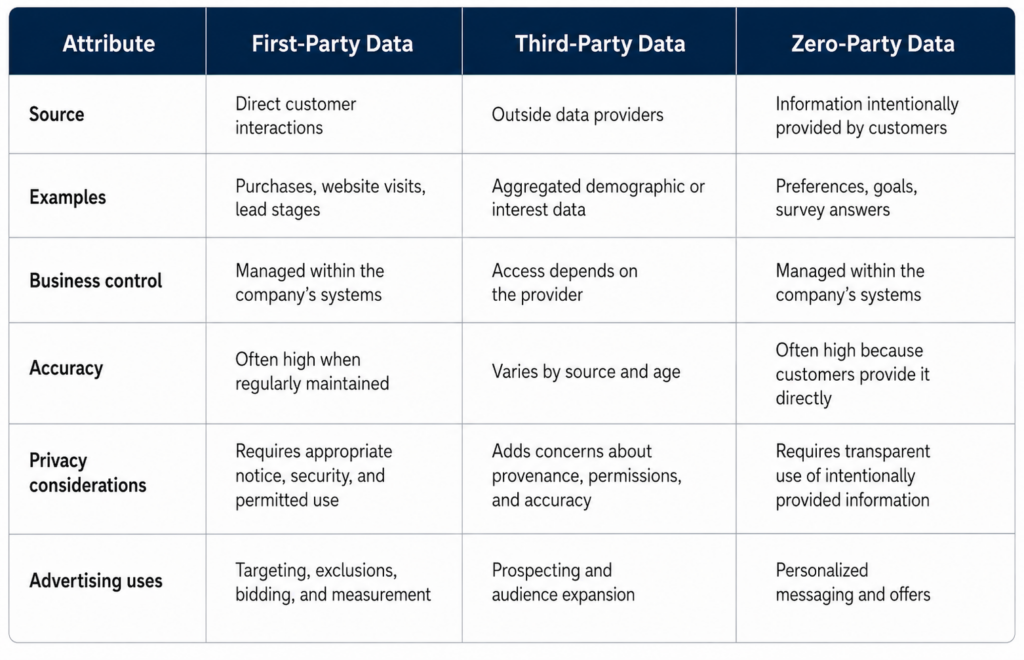
Zero-party data is closely related to first-party data, but the terms are not interchangeable. First-party data can include observed behavior, such as website visits or purchase activity. Zero-party data is information a customer chooses to provide, such as product preferences, communication choices, or business goals.
First-Party Data Examples at a Glance
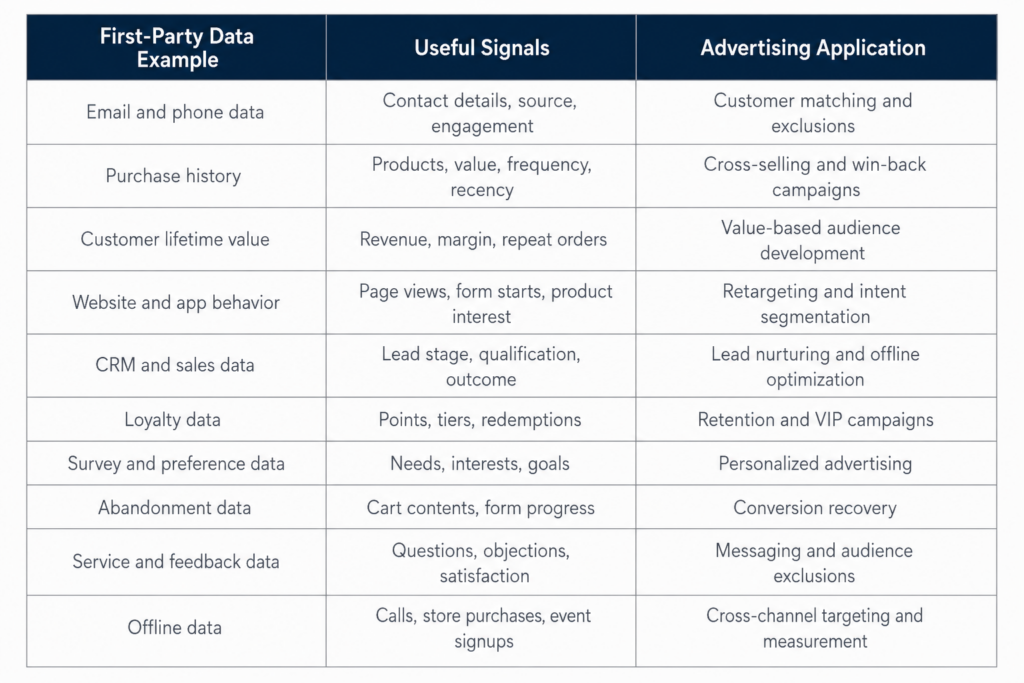
10 Real-World First-Party Data Examples
1. Email and Phone Subscriber Data
Email addresses and phone numbers are among the most portable customer identifiers a business can collect.
What it includes: Contact information, signup source, consent status, subscription date, email engagement, and SMS preferences.
How to collect it: Newsletter forms, account registrations, checkout opt-ins, gated resources, event registrations, and preference centers.
How to use it: Upload appropriate customer records to Google Customer Match or Meta Custom Audiences. Businesses can reconnect with subscribers, exclude existing customers from certain acquisition campaigns, or use valuable customer groups as audience signals.
Google recommends Customer Match audience lists with at least 100 active users to reduce the chance that ads will not serve. The number of matched, active users may be lower than the total number of records uploaded.[³]
Example segment: Subscribers who clicked a product-related email within the past 30 days but have not made a purchase.
Measure: Match rate, conversion rate, cost per acquisition, and revenue by segment.
2. Purchase and Order History
Purchase data shows what customers buy, how much they spend, and how recently they completed an order.
What it includes: Products purchased, order value, category, transaction date, purchase frequency, discount usage, and return activity.
How to collect it: Ecommerce platforms, point-of-sale systems, subscription systems, and order-management software.
How to use it: Create audiences for complementary products, replenishment reminders, customer retention, lapsed-buyer reactivation, and new-customer exclusions.
Example segment: Customers who purchased a primary product six months ago but have not purchased the related accessory.
Measure: Repeat-purchase rate, average order value, cost per returning customer, and return on ad spend.
3. Customer Lifetime Value and Value Tiers
Customer lifetime value, or CLV, estimates the value a customer generates across their relationship with a business.
What it includes: Total revenue, purchase frequency, average order value, gross margin, subscription length, and retention period.
How to collect it: Combine transaction, CRM, subscription, and customer-account data.
How to use it: Separate high-value customers from occasional or low-margin buyers. These segments can support value-based bidding, retention campaigns, and audience development based on profitable customers.
A large seed audience is not automatically the most useful audience. A smaller group of loyal, high-margin customers may provide a more relevant signal than a broad list containing one-time discount shoppers.
Example segment: Customers with at least three purchases and a total lifetime value above the company’s average.
Measure: Customer lifetime value, acquisition cost by value tier, retention rate, and long-term return on ad spend.
4. Website and App Behavior
Website and app activity can show what visitors are researching before they contact a business or make a purchase.
What it includes: Product views, service-page visits, pricing-page activity, form starts, downloads, repeat visits, and completed events.
How to collect it: Analytics tools, advertising tags, server-side tracking, consent-management systems, and app analytics.
How to use it: Build intent-based audiences, reconnect with engaged visitors, and tailor advertising to the products or services people viewed.
Example segment: Visitors who viewed a pricing page twice and started a consultation form without completing it.
Measure: Assisted conversions, cost per lead, form-completion rate, and conversion rate by behavior group.
5. CRM Lead Stage and Sales Outcome Data
CRM data is especially valuable for businesses that depend on consultations, quotes, appointments, applications, or sales conversations.
What it includes: Lead source, service interest, qualification status, sales stage, appointment status, estimated value, and closed-won or closed-lost outcomes.
How to collect it: Connect website forms, call-tracking systems, scheduling platforms, sales activity, and customer records to the CRM.
How to use it: Create audiences for active prospects, exclude existing customers, reconnect with stalled opportunities, and return qualified-lead or closed-sale information to advertising platforms.
This helps campaigns move beyond optimizing for raw lead volume. A form submission does not always represent a qualified prospect. Feeding later sales outcomes back into the advertising system can provide a clearer signal of which campaigns generate revenue.
Example segment: Sales-qualified leads who requested a proposal but have not responded within 14 days.
Measure: Cost per qualified lead, lead-to-sale rate, revenue per lead, and customer acquisition cost.
6. Loyalty and Repeat-Purchase Data
Loyalty programs show which customers engage consistently and respond to rewards.
What it includes: Enrollment date, point balance, membership tier, redemption activity, purchase frequency, and reward preferences.
How to collect it: Loyalty software, customer accounts, ecommerce systems, and point-of-sale integrations.
How to use it: Promote exclusive offers, reward high-value members, reconnect with inactive members, and exclude loyal customers from generic acquisition offers.
Example segment: Loyalty members who previously purchased every 60 days but have not ordered in the past 90 days.
Measure: Redemption rate, repeat-purchase rate, retention rate, and revenue per member.
7. Survey, Quiz, and Preference Data
Surveys, quizzes, and preference centers collect zero-party data that customers intentionally share.
What it includes: Product interests, service needs, budget range, goals, purchase timeline, communication preferences, and customer challenges.
How to collect it: Website quizzes, onboarding forms, customer surveys, consultation questionnaires, and email preference centers.
How to use it: Match advertising messages with declared needs instead of relying only on inferred behavior.
Example segment: Prospects who selected “within the next 30 days” as their expected purchase timeline.
Measure: Conversion rate by preference, lead quality, engagement rate, and cost per acquisition.
8. Cart and Form-Abandonment Data
An abandoned cart or incomplete form can indicate stronger intent than a general website visit.
What it includes: Cart contents, cart value, checkout stage, form progress, selected service, and abandonment time.
How to collect it: Ecommerce checkout systems, form analytics, customer accounts, and permission-based contact capture.
How to use it: Run reminder campaigns, show relevant products or services, and identify steps where prospects leave the conversion process.
Example segment: Shoppers who placed more than $150 in their carts but did not complete checkout within 24 hours.
Measure: Recovered revenue, checkout-completion rate, cost per recovered order, and incremental conversion rate.
9. Customer Service, Review, and Satisfaction Data
Customer questions and feedback can improve both audience selection and advertising messages.
What it includes: Support topics, chat transcripts, review scores, net promoter scores, return reasons, objections, and resolution status.
How to collect it: Help-desk platforms, call recordings, chat systems, review platforms, and post-purchase surveys.
How to use it: Develop ads that address recurring objections, identify potential advocates, and exclude customers with unresolved service issues from promotional campaigns.
Example segment: Satisfied customers who gave a five-star review and agreed to receive marketing communications.
Measure: Referral conversions, response rate, customer retention, and sentiment by audience.
10. Offline Purchase, Call, and In-Store Data
First-party data does not need to originate online. Phone calls, store visits, trade shows, appointments, and offline transactions can all contribute valuable signals.
What it includes: Call outcomes, appointment attendance, store purchases, event signups, consultation results, and offline revenue.
How to collect it: Point-of-sale systems, call-tracking platforms, appointment software, event forms, and CRM records.
How to use it: Connect offline customers with online campaigns, create location-specific audiences, and import sales outcomes for stronger campaign measurement.
Example segment: Customers who purchased in a physical store but have not created an online account.
Measure: Store revenue influenced by ads, call-to-sale rate, appointment revenue, and offline conversion value.
How to Turn First-Party Data Into Better Ads
Collecting customer information is only the beginning. Businesses need a repeatable process for making the data accurate, usable, and relevant to campaign goals.
1. Inventory Your Data Sources
Identify where customer and prospect information currently lives. Common systems include:
- Ecommerce platforms
- CRM software
- Email platforms
- Point-of-sale systems
- Call-tracking tools
- Scheduling platforms
- Loyalty programs
- Analytics platforms
- Customer service software
The goal is to determine what data exists, who controls it, how current it is, and how it connects to revenue.
2. Confirm Permissions and Data Use
Document how information was collected and what customers were told about its use. Privacy requirements vary by jurisdiction, data type, business activity, and intended purpose.
Businesses should maintain clear privacy notices, honor applicable consumer requests, and protect customer information. The California Consumer Privacy Act provides qualifying consumers with rights related to accessing, correcting, deleting, and limiting certain uses of their personal information.[²]
Businesses should consult qualified legal counsel for guidance about their specific compliance obligations.
3. Clean and Standardize the Records
Remove duplicates, correct formatting issues, update outdated records, and confirm consent status.
Google’s Customer Match guidance provides specific formatting requirements for customer data uploads. Depending on the available information, records may contain identifiers such as email addresses, phone numbers, names, countries, and postal codes.[⁴]
Data-quality improvements may include:
- Removing duplicate contacts
- Standardizing email addresses
- Formatting phone numbers consistently
- Correcting invalid fields
- Separating customers from prospects
- Removing opted-out contacts
- Updating sales stages
- Excluding stale records
Clean records can improve audience organization and reduce problems during list uploads. However, uploading more identifiers does not guarantee that every record will match an active platform user.
4. Build Goal-Based Audiences
Avoid creating audiences simply because the data is available. Each segment should support a defined advertising objective.
Examples include:
- Acquire customers similar to high-value buyers
- Re-engage qualified leads
- Recover abandoned transactions
- Promote complementary products
- Exclude recent customers
- Retain loyalty members
- Reconnect with inactive accounts
Meta Lookalike Audiences can use an existing source audience to identify people who share characteristics with customers or prospects already connected to the business.[⁵]
The quality and relevance of the source audience may matter more than its total size. A customer group tied to repeat purchases, qualified leads, or strong lifetime value can provide a clearer business signal than a general subscriber list.
5. Connect Advertising to Sales Outcomes
Measure more than clicks, forms, or online purchases. Connect campaigns with qualified leads, completed consultations, closed sales, repeat orders, and customer value.
Useful measurements include:
- Cost per qualified lead
- Customer acquisition cost
- Return on ad spend
- Lead-to-sale rate
- Repeat-purchase rate
- Revenue by audience segment
- Customer lifetime value
For lead-generation businesses, this may require connecting advertising platforms with CRM stages, call outcomes, appointment records, or closed-sale revenue.
This connection helps marketers identify campaigns that produce real customers rather than campaigns that simply generate a high number of low-quality inquiries.
6. Refresh and Maintain Audiences
Customer records change over time. New customers purchase, leads move through the sales process, subscribers opt out, and old records become less useful.
Google Customer Match lists have a maximum membership duration of 540 days. To remain eligible, a list must contain at least 100 members added or updated within the previous 540 days. Google recommends regularly refreshing lists through manual uploads, continuous CRM synchronization, or another supported method.[⁶]
Automated CRM connections can make updates more consistent than occasional manual uploads. They can also help businesses remove customers from acquisition audiences, update lead stages, and respond to changes in consent status.
Signs Your First-Party Data Is Not Ad-Ready
A business may have plenty of customer information but still be unable to use it effectively.
Common warning signs include:
- Customer records are scattered across disconnected systems.
- Paid-media teams cannot separate prospects from customers.
- Recent buyers continue receiving new-customer ads.
- Sales outcomes are not connected to campaign reporting.
- Customer lists contain duplicates or outdated records.
- Consent and opt-out status are unclear.
- Advertising reports stop at form submissions.
- No one can calculate revenue by lead source or audience.
- High-value customers are treated the same as one-time buyers.
- CRM stages are inconsistent or rarely updated.
These gaps can cause poor targeting, inefficient bidding, inaccurate reporting, and unnecessary advertising costs.
Put Your First-Party Data to Work With National Positions
Many businesses already have valuable customer data. The information may be separated across ecommerce, CRM, analytics, advertising, sales, call-tracking, and customer service systems.
National Positions helps businesses identify those gaps and build a first-party data strategy focused on measurable advertising outcomes. With more than 22 years of digital marketing experience and Google Premier Partner status, our team can help connect customer insights with paid-media targeting, exclusions, conversion tracking, and campaign reporting.
A First-Party Data Activation Review can evaluate:
- Available customer data sources
- CRM and advertising-platform connections
- Audience segmentation opportunities
- Customer and lead exclusions
- Data-quality and match-rate issues
- Offline conversion tracking
- Lead-quality reporting
- Customer-lifetime-value measurement
- Consent and data-governance processes
Turn Customer Data Into Better Ad Decisions
Stop paying to reach people who are unlikely to buy. Book a free strategy consultation with National Positions to identify the first-party data your business already has, uncover activation gaps, and build advertising campaigns around more meaningful customer signals.
Frequently Asked Questions
Can first-party data be used without third-party cookies?
Yes. Customer lists, CRM records, purchase information, offline conversions, and other permission-based business data can support advertising without depending entirely on third-party cookies.
Google’s decision to maintain user choice for third-party cookies in Chrome does not reduce the value of first-party data. Businesses still face browser restrictions, privacy controls, regulatory obligations, and limits on cross-site tracking.[¹]
Available advertising features, consent requirements, and platform policies vary. Businesses should verify current platform rules before uploading or activating customer data.
What first-party data should a small business activate first?
Start with information tied closely to revenue. This may include existing customers, qualified leads, completed purchases, consultation bookings, repeat orders, and closed sales.
These signals often provide more business value than broad website traffic because they help marketers distinguish casual visitors from people who became qualified prospects or customers.
How much first-party data is needed for advertising?
Platform eligibility requirements and practical audience sizes are different.
Google Customer Match lists need at least 100 active users to serve in applicable campaigns. Uploaded lists can contain more records than the final matched audience because not every customer record will correspond with an active Google user.[³]
A smaller, accurate group of recent customers may still be more useful than a large database filled with duplicates, inactive contacts, or low-quality leads.
How often should customer audiences be updated?
Update audiences often enough to reflect new customers, purchases, changing lead stages, consent changes, and opt-outs. The appropriate frequency depends on sales volume and the length of the buying cycle.
Google recommends regularly refreshing Customer Match lists. List memberships have a maximum duration of 540 days, and a list must contain at least 100 members added or updated during that period to remain eligible.[⁶]
What makes first-party data usable for advertising?
Useful first-party data is accurate, current, properly formatted, permission-based, and connected to a specific campaign objective.
The data should help distinguish between:
- Website visitors
- Subscribers
- New leads
- Qualified prospects
- Current customers
- Repeat customers
- High-value customers
- Inactive customers
A large database has limited advertising value when records are outdated, customer types are mixed together, or sales outcomes are missing.
Sources
- Google Privacy Sandbox. “Next Steps for Privacy Sandbox and Tracking Protections in Chrome.”
- California Department of Justice. “California Consumer Privacy Act.”
- Google Ads Help. “Fix Customer Match Issues With List Upload, Small List Size, or Low Volume.”
- Google Ads Help. “Create a Customer Match List by Uploading a Data File.”
- Meta Business Help Center. “Create a Lookalike Audience.”
- Google Ads Help. “About Customer Match.”