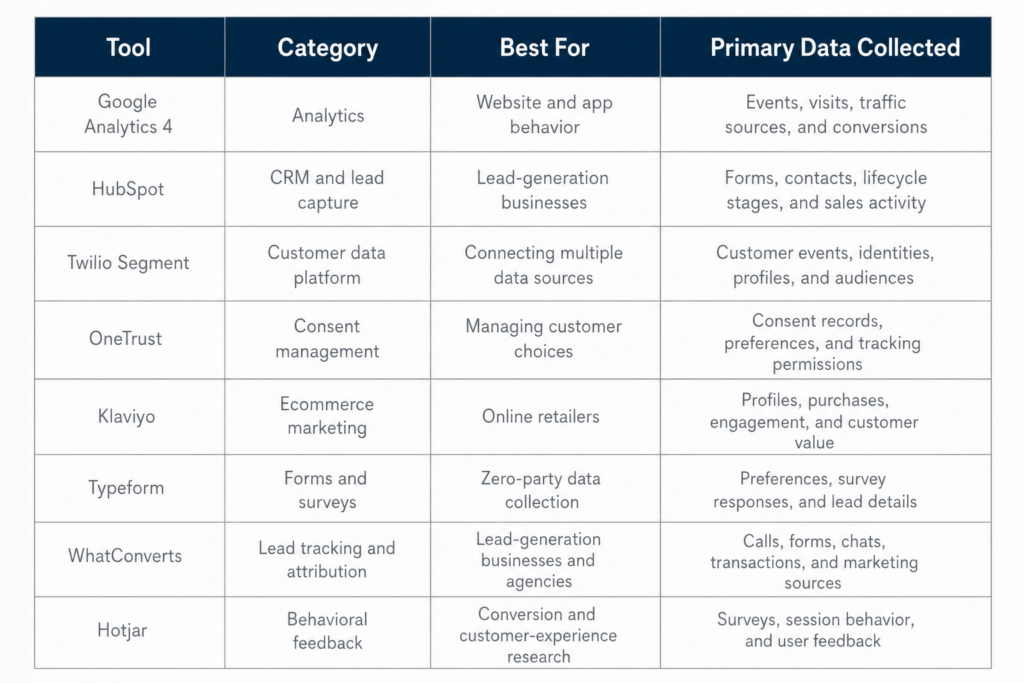
The best first-party data collection tools for 2026 include Google Analytics 4 for website and app behavior, HubSpot for lead and CRM data, Twilio Segment for customer data unification, OneTrust for consent management, Klaviyo for ecommerce data, Typeform for declared customer information, WhatConverts for lead attribution, and Hotjar for customer feedback.
These platforms perform different functions. The right choice depends on the information your business needs, the systems already in place, and how the data will support advertising, sales, personalization, and revenue measurement.
For many businesses, the strongest first-party data stack is not the one with the most software. It is the one that connects customer interactions with qualified leads, sales, repeat purchases, and other meaningful outcomes.
Key Takeaways
- Google Analytics 4 provides an event-based foundation for website and app measurement.
- HubSpot combines forms, customer records, lifecycle stages, sales activity, and marketing automation.
- Twilio Segment helps organizations collect, clean, unify, and activate customer data across numerous systems.
- OneTrust supports consent and preference management across digital channels.
- Klaviyo is designed for ecommerce businesses using purchase, profile, email, and SMS data.
- Typeform helps collect survey responses, customer preferences, lead details, and other zero-party data.
- WhatConverts connects calls, forms, chats, and ecommerce transactions with their marketing sources.
- Hotjar adds qualitative feedback and behavioral context to quantitative analytics.
- Most small and midsize businesses do not need every platform included in this guide.
- First-party data software should be selected around a defined business goal, not the length of its feature list.
What Is a First-Party Data Collection Tool?
A first-party data collection tool helps a business capture information through customer touchpoints it controls.
These touchpoints may include:
- Websites
- Mobile apps
- Ecommerce stores
- Contact forms
- Customer accounts
- Email and SMS programs
- Phone calls
- Sales conversations
- Surveys
- Loyalty programs
- Point-of-sale systems
The software may collect customer behavior, contact details, purchase records, sales stages, consent choices, survey responses, or offline interactions.
Some platforms collect information directly. Others organize, connect, govern, analyze, or activate information gathered through another system. Analytics platforms, CRMs, customer data platforms, consent-management systems, form builders, and lead-attribution tools can all contribute to a first-party data strategy.
Best First-Party Data Collection Tools at a Glance
How We Evaluated These Tools
These tools were evaluated by category instead of being placed into a single universal ranking. Google Analytics 4, HubSpot, OneTrust, and WhatConverts solve different problems, so an overall first-place ranking would provide limited practical value.
The evaluation considered:
- Types of data collected
- Integration capabilities
- Audience and campaign applications
- Consent and governance features
- Reporting options
- Implementation requirements
- Suitability for small and midsize businesses
- Scalability
- Data portability
- Potential limitations
Pricing was not used as the primary ranking factor because costs can change based on contact volume, website traffic, messaging volume, account features, integrations, and implementation support.
Businesses should verify current prices, plan limits, and contract requirements directly with each provider before making a purchase.
1. Google Analytics 4: Best for Website and App Behavior
Best for: Businesses that need to measure digital activity, traffic sources, and conversions
Google Analytics 4 collects event-based data from websites and apps. Events can represent page views, clicks, purchases, form interactions, downloads, and other customer actions. Google provides recommended events for activities such as online sales, lead generation, education, real estate, and travel.
What Google Analytics 4 Can Collect
- Page views
- User sessions
- Traffic sources
- Link clicks
- File downloads
- Site searches
- Form interactions
- Ecommerce purchases
- Custom events
- Website and app conversions
Enhanced measurement can collect selected website interactions after the features are enabled in the Google Analytics interface. This can reduce the need for separate code changes for each supported event. Businesses should still review their setup and determine which events represent important customer actions.
Strengths
- Measures websites and apps
- Uses a flexible event-based model
- Supports custom events
- Allows selected events to be marked as key events
- Integrates with Google advertising products
- Supports ecommerce and lead-generation measurement
- Has no standard platform subscription fee
Google Analytics allows a collected event to be designated as a key event when it represents an action that matters to the business.
Potential Limitations
Google Analytics 4 is not a CRM or complete customer database. It can report digital behavior, but it may not reveal which inquiries became qualified opportunities or customers unless sales and revenue information is connected through other systems.
Google Analytics reports may also include modeled data when an event cannot be observed directly.
Who Should Consider It?
Google Analytics 4 is appropriate for most businesses that need a foundation for website or app measurement. Its value increases when event definitions reflect meaningful actions, such as completed purchases, booked appointments, qualified inquiries, or account registrations.
2. HubSpot: Best for CRM and Lead Collection
Best for: Service businesses, B2B companies, and organizations that need to connect lead capture with sales activity
HubSpot combines CRM, marketing, sales, and customer-service capabilities. Its forms can collect customer information and add it to contact records, while lifecycle stages help teams track how contacts and companies progress through marketing and sales processes.
What HubSpot Can Collect
- Names and email addresses
- Phone numbers
- Form responses
- Company information
- Lead sources
- Lifecycle stages
- Sales activities
- Communication history
- Deal information
- Closed revenue
Strengths
- Connects forms with CRM records
- Supports contact segmentation
- Tracks lifecycle stages
- Combines marketing and sales information
- Offers automation and workflow capabilities
- Provides a central location for customer activity
- Integrates with many marketing and sales tools
HubSpot lifecycle stages can help businesses organize contacts and companies based on their progression through a defined process. HubSpot also supports automated lifecycle-stage updates in eligible configurations.
Potential Limitations
Available features depend on the selected subscription. Costs may rise as a business adds marketing contacts, users, workflows, reporting features, or sales functionality.
HubSpot also depends on consistent CRM management. Duplicate records, incomplete sales updates, unclear lifecycle stages, or inconsistent form fields can weaken reporting and audience quality.
Who Should Consider It?
HubSpot is a strong option for businesses that need to connect website inquiries with lead qualification, sales follow-up, customer records, and ongoing marketing communication.
3. Twilio Segment: Best Customer Data Platform
Best for: Businesses that need to collect information from multiple systems and send it to several marketing, analytics, or customer-experience platforms
Twilio Segment is a customer data platform that can collect, clean, unify, and activate customer information. Segment sources can receive data from websites, mobile apps, servers, and other systems. Destinations send that information to analytics, advertising, messaging, data-warehouse, and customer-engagement tools.
What Segment Can Collect and Connect
- Website events
- Mobile-app events
- Server activity
- Customer identities
- Product usage
- Transaction data
- CRM information
- Customer profiles
- Audience membership
Strengths
- Connects multiple customer-data sources
- Routes data to many destinations
- Supports customer-profile unification
- Can send data to warehouses and operational platforms
- Reduces the need to build a separate integration for each destination
- Supports organizations with complex customer journeys
- Provides tools for data collection and schema control
Twilio states that Segment can collect first-party data from customer touchpoints and activate it through a data warehouse or hundreds of available destinations.
Potential Limitations
Segment may require technical implementation, data planning, event governance, and ongoing maintenance. Businesses need clear naming conventions and rules for how customer events are collected and used.
A customer data platform may also be excessive for a small business operating one website, one CRM, and a limited number of campaigns.
Who Should Consider It?
Segment is better suited to organizations with customer information spread across numerous systems that need to activate consistent data across several channels.
4. OneTrust: Best for Consent Management
Best for: Businesses that need to collect, document, and communicate user choices across digital environments
OneTrust offers consent and preference-management tools for web, mobile, connected television, and other digital touchpoints. A consent-management platform can help an organization collect, manage, and document choices related to cookies, data processing, and personalized advertising.
What OneTrust Can Collect
- Cookie preferences
- Tracking permissions
- Purpose-based consent
- Communication preferences
- Opt-in records
- Opt-out records
- Preference-center selections
Strengths
- Centralizes consent and preference records
- Supports multiple digital channels
- Can communicate consent signals to connected systems
- Supports region-specific consent experiences
- Helps document customer choices
- Provides a central preference-management option
OneTrust also offers tools intended to give users control over consent, preferences, and first-party data through a central portal.
Potential Limitations
A consent-management platform does not automatically make every business practice legally compliant. Configuration, disclosures, security, retention, data sharing, and actual company practices still require review.
OneTrust may also provide more complexity than a small business with a limited digital footprint requires.
Who Should Consider It?
OneTrust may fit companies operating across several websites, applications, countries, brands, or data environments that need centralized consent and preference management.
5. Klaviyo: Best for Ecommerce Customer Data
Best for: Ecommerce brands that want to use customer profiles, purchase activity, email engagement, SMS engagement, and customer value
Klaviyo allows businesses to build customer segments using profile attributes, customer actions, purchasing behavior, and predictive information. Its segmentation capabilities can support customer-lifetime-value groups, repeat-purchase campaigns, and other ecommerce use cases.
What Klaviyo Can Collect
- Contact details
- Email engagement
- SMS engagement
- Purchase history
- Product activity
- Profile properties
- Customer location
- Customer lifetime value
- Predicted customer behavior
Strengths
- Built for ecommerce customer engagement
- Supports dynamic audience segments
- Uses purchase and profile information
- Supports retention and cross-selling workflows
- Includes customer-lifetime-value segmentation
- Combines email and SMS activation
- Can update segments as customer behavior changes
Klaviyo’s customer-lifetime-value tools can group customers based on historical and predicted value, allowing brands to create targeted content and automated flows.
Potential Limitations
Klaviyo does not replace a complete CRM, analytics platform, consent-management system, or enterprise customer data platform.
Costs may also rise as active profile counts and messaging volumes increase.
Who Should Consider It?
Klaviyo is a strong fit for ecommerce companies that want to connect purchase behavior, customer profiles, and engagement data with automated email and SMS campaigns.
6. Typeform: Best for Surveys, Quizzes, and Preference Data
Best for: Businesses collecting declared interests, customer feedback, qualification details, and zero-party data
Typeform can be used to build forms, surveys, quizzes, and lead-generation experiences. Its response tools allow users to review individual answers, download collected information, and examine broader response trends.
What Typeform Can Collect
- Lead information
- Product preferences
- Customer goals
- Budget ranges
- Purchase timelines
- Satisfaction responses
- Event registrations
- Qualification details
- Survey feedback
Strengths
- Supports forms, surveys, and quizzes
- Offers conditional logic
- Connects with CRM and marketing tools
- Supports webhooks and automations
- Provides individual and aggregate response analysis
- Can support consultation and lead-qualification workflows
- Offers partial-response features on eligible plans
Typeform can capture selected partial responses through Partial Submit Points. Some plans also support capturing partial answers after each question when a person leaves before completing the form.
Potential Limitations
Long forms and unnecessary questions can reduce completion rates. Businesses should collect information tied to a defined customer or marketing use.
Advanced logic, integrations, and partial-response features may also require a paid plan.
Who Should Consider It?
Typeform is useful for businesses that need more context than a basic newsletter or contact form provides. It can support customer research, consultations, product recommendations, onboarding, and lead qualification.
7. WhatConverts: Best for Lead Tracking and Marketing Attribution
Best for: Lead-generation businesses and marketing agencies that need to connect calls, forms, chats, and ecommerce transactions with their marketing sources
WhatConverts is a lead-tracking and attribution platform that captures calls, form submissions, chats, and ecommerce transactions. It then connects those leads with the marketing sources that generated them.
This makes WhatConverts especially relevant for businesses that generate inquiries through several channels and need to understand which campaigns are producing qualified opportunities or sales.
What WhatConverts Can Collect
- Phone calls
- Form submissions
- Chat leads
- Ecommerce transactions
- Marketing sources
- Campaign data
- Keyword data
- Landing-page information
- Lead qualification
- Lead value
- Sales outcomes
Strengths
- Tracks several lead types in one platform
- Connects leads with marketing sources
- Supports call, form, chat, and ecommerce tracking
- Helps teams qualify and organize leads
- Provides lead-attribution reporting
- Offers API access for sending and receiving data
- Supports agency and client reporting
- Can connect marketing activity with lead value
WhatConverts describes lead tracking as the foundation of its platform. Its system captures each supported lead type and associates the interaction with its marketing source.
The platform also offers attribution settings that determine how leads receive credit across marketing channels or campaigns. Some attribution-model features depend on the selected plan.
Potential Limitations
WhatConverts requires careful implementation. Tracking numbers, forms, source data, attribution settings, integrations, and lead-qualification criteria must be configured consistently.
Lead volume should not be treated as the only measure of success. Businesses still need to define what qualifies as a valuable inquiry and connect leads with appointments, opportunities, sales, or revenue.
Integration depth should also be evaluated before implementation. A listed connection may not transfer every field required by a company’s sales or reporting process.
Who Should Consider It?
WhatConverts is well suited to businesses that receive leads through several channels, particularly phone calls and website forms.
Potential users include:
- Home-service companies
- Professional-service firms
- Healthcare practices
- Local businesses
- Franchises
- Multi-location organizations
- Marketing agencies
- Businesses with longer sales cycles
For these organizations, the platform can help distinguish between campaigns that produce activity and campaigns that generate qualified leads or revenue.
8. Hotjar: Best for Behavioral Feedback
Best for: Businesses investigating why users struggle, abandon forms, or fail to convert
Hotjar provides survey and session-recording tools that add qualitative context to quantitative analytics. In supported survey formats, teams can connect an individual’s survey response with the associated session recording. This helps compare what the user reported with what occurred during the website visit.
What Hotjar Can Collect
- Survey responses
- Website feedback
- Session behavior
- Navigation patterns
- Conversion obstacles
- User-reported concerns
- Device and page context
Strengths
- Adds qualitative context to analytics
- Supports website and conversion research
- Helps identify usability concerns
- Connects certain survey responses with recordings
- Provides individual and aggregated survey results
- Can target surveys based on website events
Hotjar surveys are designed to capture direct customer feedback. Survey reporting can include response metrics, individual answers, URLs, browser details, device information, and other associated metadata.
Potential Limitations
Behavioral and feedback tools do not replace analytics, CRM data, lead qualification, or sales reporting. They help explain a user’s experience but do not independently show which marketing campaigns produced profitable customers.
Businesses should also configure privacy controls carefully and avoid capturing sensitive customer information through recordings or survey tools.
Who Should Consider It?
Hotjar is most useful when analytics reveal a conversion problem but do not explain why visitors are leaving or struggling.
Do You Need All of These Tools?
Most businesses do not need every platform in this guide.
A practical starter stack may include:
- Google Analytics 4 for digital behavior
- A CRM for leads and customers
- Consent controls
- An email or ecommerce platform
- Advertising-platform integrations
A growing lead-generation business may add:
- WhatConverts for call, form, chat, and lead attribution
- Marketing automation
- Offline conversion tracking
- Customer feedback tools
- Server-side integrations
- Centralized reporting
A larger, multichannel organization may need:
- A customer data platform
- A data warehouse
- Identity resolution
- Advanced preference management
- Automated audience synchronization
- Business-intelligence tools
The right combination should reflect the actual customer journey. A phone-driven service business needs a different first-party data stack from an ecommerce retailer, software provider, or subscription company.
How to Choose the Right First-Party Data Tools
1. Define the Business Outcome
Begin with a specific problem, such as:
- Improving lead quality
- Connecting advertising with closed sales
- Reducing customer-acquisition costs
- Increasing repeat purchases
- Recovering abandoned transactions
- Measuring offline conversions
- Creating more relevant customer segments
Avoid purchasing software before identifying the decision, process, or campaign it should improve.
2. Audit the Tools You Already Use
Document:
- What each platform collects
- Which system stores customer records
- Which platform records sales
- How advertising conversions are defined
- Where consent choices are maintained
- Which integrations are active
- Where reporting conflicts occur
Many businesses already have enough software. Their primary problem may be incomplete configuration, unclear ownership, or disconnected systems.
3. Review Integration Depth
A platform logo on an integration page does not guarantee that the connection transfers every field your business needs.
Ask:
- Which records move between platforms?
- Does data flow in one direction or both directions?
- How frequently does information update?
- Are historical records included?
- Can custom fields be mapped?
- How are errors reported?
- Will ongoing technical support be required?
4. Evaluate Data Access and Portability
Review:
- Export options
- API access
- Historical data availability
- Retention rules
- Contract commitments
- Migration requirements
- Data ownership terms
Your company should be able to access and use its first-party data without becoming unnecessarily dependent on a single provider.
5. Assess Consent and Governance Requirements
Consider:
- How consent is collected
- Where preferences are stored
- How opt-outs are communicated
- Who can access customer records
- How long information is retained
- How deletion and correction requests are handled
- Which sensitive data should be excluded
Software can support these processes, but it cannot replace appropriate legal guidance or responsible internal practices.
6. Calculate the Total Cost
The full cost may include:
- Subscription fees
- Contact or profile limits
- Messaging volume
- Website traffic
- Data storage
- Implementation
- Custom integrations
- Engineering support
- Training
- Reporting
- Ongoing maintenance
A low subscription price may not represent a low total cost when setup requires extensive technical work.
7. Define Success Before Implementation
Useful measurements may include:
- Improved lead-to-sale reporting
- Fewer duplicate customer records
- Faster audience updates
- Better conversion attribution
- More complete sales data
- Reduced manual reporting
- Improved customer retention
- Lower customer-acquisition costs
- Increased revenue from identified audiences
- A higher percentage of qualified leads
Common First-Party Data Tool Mistakes
- Buying a customer data platform before fixing CRM records
- Collecting information without an activation plan
- Purchasing platforms with overlapping capabilities
- Treating every website event as equally valuable
- Ignoring phone calls, consultations, and offline sales
- Depending on manual customer-list uploads indefinitely
- Assuming an integration transfers every needed field
- Measuring lead volume without tracking qualification or revenue
- Treating a consent banner as a complete privacy program
- Selecting software the internal team cannot maintain
How National Positions Helps Connect the Tools
Choosing first-party data software is one part of the process. The platforms must also support advertising, conversion tracking, customer segmentation, lead qualification, and revenue reporting.
National Positions helps businesses evaluate how their analytics, CRM, ecommerce, lead-attribution, advertising, and customer-data systems work together.
Rather than recommending additional software by default, our team can help identify:
- Missing or duplicated tracking
- Disconnected customer records
- Unused first-party data
- Weak audience segmentation
- CRM and advertising gaps
- Missing offline conversions
- Inconsistent lead-stage reporting
- Unclear conversion definitions
- Reports that stop at form submissions
- Opportunities to connect campaigns with revenue
Our work can include:
- Analytics configuration
- Paid-media activation
- Conversion tracking
- Audience strategy
- Lead tracking and qualification
- Marketing attribution
- Offline conversion integration
- Conversion-rate optimization
- Cross-channel reporting
Build a First-Party Data Stack Around Business Results
The best first-party data collection tool depends on what your business needs to learn, measure, and improve.
Google Analytics 4 can track digital interactions. HubSpot can organize leads and sales stages. Segment can connect customer information across systems. OneTrust can manage consent choices. Klaviyo can activate ecommerce profiles. Typeform can collect declared preferences. WhatConverts can connect calls, forms, chats, and transactions with their marketing sources. Hotjar can add direct customer feedback and behavioral context.
The greatest value comes from how those systems work together.
Your business may not need another platform. It may need stronger connections between the technology it already uses.
Book a free strategy consultation with National Positions to evaluate your first-party data collection, analytics, CRM, paid-media tracking, lead attribution, and revenue reporting.
Frequently Asked Questions
What is the best first-party data collection tool?
There is no single best platform for every business. Google Analytics 4 is commonly used for website and app behavior. HubSpot can support lead and CRM data. Segment can connect multiple data sources. OneTrust can support consent management. WhatConverts can track and attribute calls, forms, chats, and ecommerce leads.
The right choice depends on the type of data being collected and how the business plans to use it.
Do small businesses need a customer data platform?
Many small businesses do not need a customer data platform initially. Analytics, a CRM, consent controls, lead tracking, and reliable advertising integrations may provide enough infrastructure.
A customer data platform becomes more useful when information is distributed across many systems and must be synchronized across several channels.
What is the difference between WhatConverts and a CRM?
WhatConverts focuses on capturing leads and attributing them to marketing sources. A CRM primarily manages contacts, sales activity, opportunities, follow-up, and customer relationships.
The two platforms can serve complementary roles. WhatConverts can help identify how an inquiry was generated, while the CRM can track what happened as the lead progressed through the sales process.
What is the difference between a CRM and a CDP?
A CRM primarily manages contacts, sales activity, lead stages, and customer relationships. A CDP collects information from several sources, unifies customer profiles, and sends audiences or customer data to other systems.
Some organizations use both because the platforms perform different functions.
Can existing first-party data tools be connected?
Often, yes. Businesses may be able to improve their systems through stronger integrations, field mapping, conversion definitions, CRM processes, and reporting before replacing a platform.
Are first-party data tools automatically privacy-compliant?
No. Software can support consent collection, preference management, access controls, and consumer-request processes. The business remains responsible for selecting, configuring, and using the platform appropriately under applicable laws and policies.
Sources
- “Google Analytics Help. “Enhanced Measurement Events.”
- “Google Analytics Help. “About Key Events.”
- “Google Analytics Help. “Recommended Events.”
- “Google Analytics Help. “Introducing the Next Generation of Analytics.”
- “Google Analytics Help. “About Modeled Key Events.”
- “HubSpot Knowledge Base. “Use Contact and Company Lifecycle Stages.”
- “HubSpot Knowledge Base. “Create and Edit Forms.”
- “HubSpot Knowledge Base. “Automatically Set and Sync Record Lifecycle Stages.”
- “Twilio Segment. “Twilio Segment Customer Data Platform.”
- “Twilio Segment Documentation. “Sources Overview.”
- “Twilio Segment Documentation. “Sending Segment Data to Destinations.”
- “Twilio Segment Documentation. “Twilio Segment.”
- “OneTrust. “Consent Management Platform.”
- “OneTrust. “What Is a Consent Management Platform?”
- “OneTrust. “Consent and Preferences.”
- “Klaviyo Help Center. “Getting Started With Segments.”
- “Klaviyo Help Center. “Segment Conditions Reference.”
- “Klaviyo Help Center. “How to Segment by Customer Lifetime Value.”
- “Typeform Help Center. “Working With Your Responses.”
- “Typeform Help Center. “Collect Partial Responses.”
- “Typeform Help Center. “Capture Partial Responses After Every Question.”
- “WhatConverts. “Lead Tracking Software.”
- “WhatConverts Help Center. “Introduction to Lead Tracking.”
- “WhatConverts Help Center. “Select an Attribution Model.”
- “Hotjar Help Center. “How to Connect Survey Responses to Recordings.”
- “Hotjar Help Center. “How to Create a Survey.”
- “Hotjar Help Center. “Understanding Your Survey Results.”