First-party data improves advertising when it changes how campaigns target audiences, measure conversions, guide bidding, and allocate budgets. Uploading a customer list is only one possible step. The data must represent meaningful business outcomes and reach advertising platforms in a format they can use.
This guide focuses on activating customer and sales data within Google Ads and Meta Ads. For background information, read our guides to first-party vs. third-party data and first-party data examples.
Key Takeaways
- Start with the advertising problem instead of the customer data available.
- Use qualified leads, sales, revenue, and customer value as campaign signals.
- Build audiences around acquisition, retargeting, retention, or exclusion goals.
- Use the correct Google or Meta product for each advertising objective.
- Connect offline sales outcomes with online campaigns.
- Evaluate business results instead of relying on audience size or match rate.
- Test first-party audience strategies against an appropriate baseline.
Start With the Advertising Problem
A first-party data strategy should improve a specific campaign decision. Beginning with the available data often leads advertisers to create audience lists without knowing how those lists will support performance.
Common advertising problems include:
- Campaigns generate leads that never become customers.
- Ad platforms cannot distinguish qualified leads from spam.
- Existing customers continue receiving acquisition ads.
- Campaigns optimize toward low-value purchases.
- Phone and offline sales are missing from reporting.
- Remarketing treats every website visitor the same.
- Sales data never returns to the advertising platform.
- Paid-media reports cannot connect ad spend with revenue.
- Bidding strategies optimize for conversion volume instead of profitability.
Identify one problem before selecting an audience, platform feature, or technical integration. The business objective should determine which data is activated and how campaign performance is evaluated.
Choose a Conversion That Reflects Business Value
Advertising platforms optimize toward the conversion signals they receive. If every form submission is recorded as a successful conversion, the platform may pursue more form submissions without accounting for lead quality.
A stronger conversion framework distinguishes among actions such as:
- Initial inquiry
- Qualified lead
- Scheduled consultation
- Attended appointment
- Proposal request
- Closed sale
- Repeat purchase
- High-margin purchase
- Subscription renewal
Lead-generation businesses can send later CRM stages back to advertising platforms. Ecommerce companies can provide transaction revenue, purchase frequency, customer-value tiers, or other approved conversion values.
The goal is to give campaign systems a clearer representation of business value. This helps advertising teams evaluate which campaigns produce customers instead of stopping their analysis at the initial website conversion.
Build Audiences Around Campaign Decisions
Every audience should support a defined campaign goal. Most first-party advertising audiences fall into four categories.
Acquisition Audiences
Acquisition audiences help advertising platforms identify or prioritize potential new customers.
Useful source groups may include:
- Sales-qualified leads
- Closed customers
- Repeat purchasers
- High-margin customers
- Customers with strong lifetime value
- Subscribers retained for a defined period
- Customers who purchased a specific service or product
The source audience should reflect the outcome the campaign is meant to produce. A campaign seeking profitable repeat customers may receive a more relevant signal from loyal buyers than from every newsletter subscriber.
Retargeting Audiences
Retargeting audiences help advertisers reconnect with known prospects or customers.
Examples include:
- Qualified leads who have not purchased
- Shoppers who abandoned a high-value cart
- Prospects who requested a proposal
- Customers approaching a renewal date
- Past purchasers due for replenishment
- Lapsed customers
- Account holders who viewed a new service
Timing matters. Someone who requested a proposal should receive a different message from a person who viewed one educational article.
Retention Audiences
Retention campaigns focus on customers who have already completed a purchase or started a business relationship.
These audiences may support:
- Subscription renewals
- Product replenishment
- Cross-selling
- Loyalty offers
- Customer education
- Re-engagement
- New product announcements
Keeping retention and acquisition audiences separate can help advertisers calculate the true cost of acquiring new customers.
Exclusion Audiences
First-party data can also identify people who should not see an ad.
Consider excluding:
- Recent purchasers from new-customer campaigns
- Existing clients from general lead-generation campaigns
- Current sales opportunities from broad remarketing
- Employees and internal testers
- Unqualified leads
- Fraudulent form submissions
- Customers with unresolved service concerns
- People outside the appropriate renewal window
Exclusions can reduce duplicated spending and prevent customers from seeing offers that do not apply to them.
How to Use First-Party Data in Google Ads
Google provides several first-party data products. Each supports a different audience or measurement objective.
Use Customer Match for Known Customers and Prospects
Google Customer Match allows eligible advertisers to use online and offline customer information to reach or re-engage customers across Search, Shopping, Gmail, YouTube, and Display.[¹]
Customer Match can support:
- Customer retention
- Lead re-engagement
- Existing-customer exclusions
- Renewal campaigns
- Cross-selling
- Audience signals
- Customer lifecycle campaigns
Avoid combining every customer and prospect into a single list. Build separate lists for qualified leads, recent customers, repeat purchasers, high-value customers, and lapsed customers.
List membership should change as customer status changes. A lead who completes a purchase may need to leave a prospect-nurturing campaign and enter an existing-customer exclusion or retention audience.
Google requires advertisers using Customer Match to comply with its Customer Match policies. Advertisers are responsible for ensuring they have the necessary rights and permissions to use uploaded customer information.[¹]
Use Audience Signals to Guide Performance Max
Performance Max campaigns allow advertisers to add audience signals at the asset-group level. Signals can include customer lists, website visitors, app users, video viewers, and other eligible audience information.[²]
Audience signals give Google information about the people most relevant to a particular offer. They guide Google’s systems but generally do not restrict campaign delivery to those audiences.
Build signals that align with the purpose of each asset group. For example, an asset group promoting a high-value service could include:
- Customers who previously purchased that service
- Qualified leads for related services
- Website visitors who viewed relevant pages
- Customers with similar purchase values
- People who completed a related conversion
Google notes that its systems may need time to integrate new audience signals and populate updated audience lists.[²]
Use Lookalike Segments in Demand Gen
Google Lookalike segments use a seed audience to help identify new people who share characteristics with existing customers or visitors. They are available for Demand Gen campaigns rather than every Google Ads campaign type.[³]
Possible seed audiences include:
- Existing customers
- Recent purchasers
- High-value customers
- Qualified leads
- Website visitors
- App users
- YouTube viewers
Google is transitioning Demand Gen Lookalike segments toward a suggestion-based model during 2026.[³] Advertisers should review the current campaign controls before assuming a Lookalike segment will strictly limit who can receive an ad.
Test different seed groups instead of assuming the largest list will produce the strongest results. A focused group of valuable customers may provide a more useful signal than a mixed list containing customers, subscribers, unqualified leads, and inactive contacts.
How to Use First-Party Data in Meta Ads
Meta provides its own audience and conversion products. Its terminology and setup differ from Google Ads.
Build Customer-List Custom Audiences
A customer-list Custom Audience allows an advertiser to create an audience using information customers have shared with the business. Meta uses a matching process to associate eligible customer records with Meta accounts.[⁴]
Custom Audiences can support:
- Customer retention
- Lead nurturing
- Renewal campaigns
- Product replenishment
- Cross-selling
- Existing-customer exclusions
- Lapsed-customer re-engagement
Organize customer lists according to lifecycle stage rather than placing all contacts into one audience.
Possible audience groups include:
- New leads
- Qualified leads
- Active opportunities
- Recent customers
- Repeat customers
- High-value customers
- Current subscribers
- Lapsed customers
Meta requires advertisers to have the necessary rights and lawful basis to use customer information when creating a Custom Audience. Uploading or hashing the data does not remove that responsibility.[⁴]
Build Lookalike Audiences From Meaningful Outcomes
Meta Lookalike Audiences help advertisers reach new people who may share characteristics with an existing source audience.[⁵]
The source audience should represent the outcome the campaign is trying to reproduce. Options may include:
- Closed customers
- Repeat buyers
- High-margin customers
- Qualified leads
- Retained subscribers
- Customers for a specific product category
- Customers who completed a high-value service
Avoid using a broad contact list simply because it contains more people. Mixed-quality audiences can include characteristics associated with unqualified prospects, low-margin buyers, or one-time discount customers.
Test multiple source audiences and compare their results against broader targeting. Performance may vary by market, campaign objective, available customer data, creative, budget, and Meta’s delivery systems.
Connect Offline Outcomes to Advertising Campaigns
Many valuable business outcomes occur after the initial website conversion.
A website lead may later:
- Complete a qualification call
- Schedule an appointment
- Attend a consultation
- Receive a proposal
- Sign a contract
- Make an in-store purchase
- Generate recurring revenue
If the advertising platform receives only the original form submission, it cannot see which campaign ultimately produced a qualified lead or sale.
Google Ads Data Manager
Google Ads Data Manager provides a centralized way to connect supported first-party data sources with Google Ads. It can be used for audience activation and conversion measurement workflows.[⁶]
Depending on the available connectors and account configuration, businesses may connect data from:
- CRM platforms
- Cloud storage services
- Data warehouses
- Customer data platforms
- Marketing applications
- Uploaded files
For lead-generation businesses, Google recommends enhanced conversions for leads through Data Manager instead of relying on standard offline conversion imports.[⁶]
Google Enhanced Conversions
Google enhanced conversions supplement existing conversion tracking with hashed first-party customer data. Google matches that information with hashed data from signed-in Google accounts to improve conversion measurement.[⁷]
Enhanced conversions can support measurement for outcomes such as:
- Online purchases
- Form submissions
- Qualified leads
- Offline sales
- Closed opportunities
The correct implementation depends on how conversions are recorded and where customer information is stored. Google supports several setup methods, including the Google tag, Google Tag Manager, Google Ads Data Manager, and supported API connections.[⁷]
Enhanced conversions are measurement features. They should not be described as interchangeable with Customer Match, which is primarily used for audience activation.
Meta Conversions API
Meta describes Conversions API as a direct connection between a business’s marketing data and Meta’s advertising systems. It can support ad targeting, optimization, and measurement.[⁸]
Depending on the implementation, businesses may send eligible:
- Website events
- App events
- Offline events
- Messaging events
- CRM events
Meta recommends using Conversions API alongside the Meta Pixel for website events when appropriate. Events sent through both sources must be deduplicated correctly so the same conversion is not counted twice.[⁹]
Conversions API does not remove the need for customer disclosures, consent management, data security, or compliance with Meta’s business tool terms.
Use Conversion Values to Guide Bidding
Conversion values help advertising platforms distinguish high-value outcomes from lower-value actions.
An ecommerce company may use:
- Transaction revenue
- Gross margin
- Product category
- Purchase frequency
- Repeat-purchase value
- Predicted customer lifetime value
A lead-generation company may estimate values using:
- Qualification rate
- Appointment rate
- Close rate
- Average sale value
- Expected revenue by service
- CRM stage
For example, a qualified lead can receive a higher value than an initial form submission. A closed sale can receive its actual revenue or another value approved by the business.
Avoid assigning values without supporting calculations. Inaccurate conversion values can direct bidding systems toward actions that appear profitable in the platform but generate limited business value.
Match Advertising to Customer Intent
Customer data becomes more useful when the campaign changes in response to the audience’s lifecycle stage.
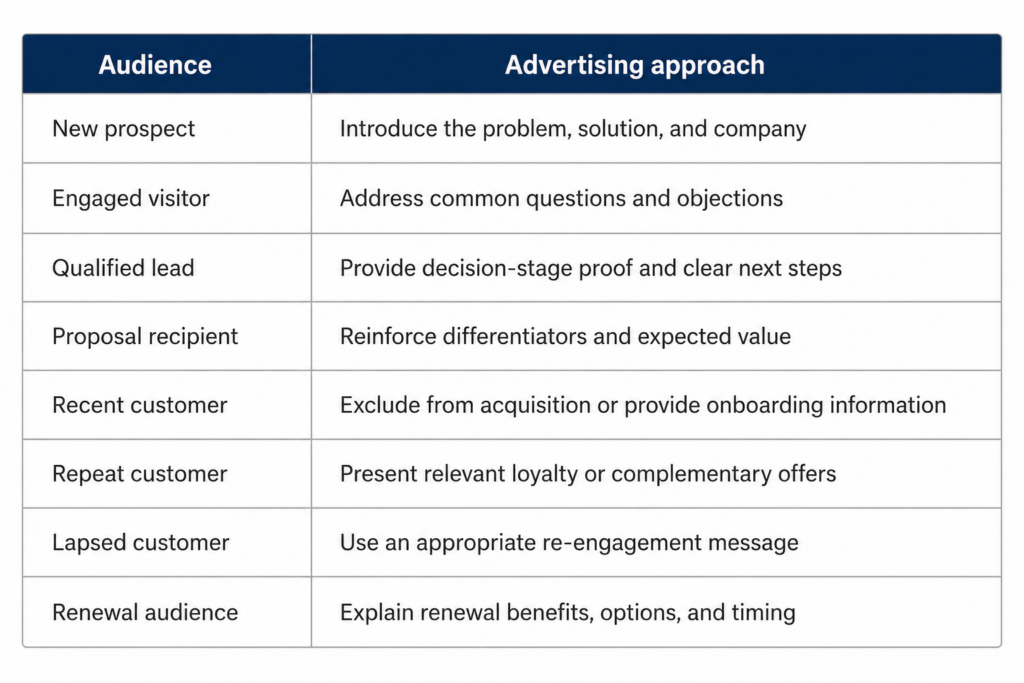
Personalization should remain proportionate. Avoid ad copy that reveals sensitive information or states details that could make customers feel closely monitored.
Test First-Party Audiences Against a Baseline
A campaign can report strong returns while reaching people who were already likely to purchase. Testing helps determine if the advertising produced additional conversions.
Possible testing approaches include:
- Audience holdouts
- Campaign experiments
- Geographic tests
- Conversion-lift studies
- Matched-market comparisons
- New-customer acquisition tests
- Incremental revenue analysis
Advertisers can also compare a first-party audience strategy against broader targeting while keeping creative, budgets, locations, and conversion definitions as consistent as possible.
Allow enough time and conversion volume for a meaningful comparison. Avoid making major decisions based on a few conversions or short-term cost changes.
Measure More Than Audience Match Rate
Match rate shows how many uploaded customer records could be associated with users on the advertising platform. It does not show if the audience generated profitable growth.
Use match rate to investigate:
- Formatting errors
- Outdated contact information
- Missing customer identifiers
- Duplicate records
- Incorrect hashing
- Small eligible audiences
- Customer-list synchronization problems
Evaluate business performance using:
- Cost per qualified lead
- Lead-to-appointment rate
- Lead-to-sale rate
- Customer acquisition cost
- New-customer revenue
- Return on ad spend
- Gross profit
- Repeat-purchase rate
- Retention rate
- Customer lifetime value
- Incremental conversions
- Incremental revenue
Separate customer acquisition from customer retention. Combining both can make acquisition costs appear lower than they are.
A 30-Day First-Party Data Advertising Plan
Businesses do not need to activate every data source at once. Start with one campaign problem and one meaningful outcome.
Week 1: Define the Outcome
- Select one campaign, product, or service.
- Define the primary business conversion.
- Identify the CRM or sales stage that represents quality.
- Calculate an initial conversion or customer value.
- Document the baseline cost and conversion rate.
Week 2: Connect the Data
- Confirm campaign-source tracking.
- Connect website leads with CRM records.
- Review phone-call and appointment tracking.
- Confirm the permitted uses of the customer data.
- Select the appropriate platform connection.
Week 3: Build the Campaign Strategy
- Create an acquisition, retargeting, retention, or exclusion audience.
- Align creative with the audience stage.
- Select the correct conversion action.
- Confirm conversion values.
- Establish a control or comparison group where practical.
Week 4: Launch and Validate
- Confirm audience eligibility and population.
- Review conversion diagnostics.
- Check for duplicate or missing events.
- Compare advertising reports with CRM outcomes.
- Establish an audience-refresh schedule.
- Define the date for the first performance review.
Once the first campaign produces reliable data, expand the process to additional products, services, locations, or advertising platforms.
Signs Your Campaign Needs a First-Party Data Audit
A campaign may need additional technical or strategic support when:
- Google or Meta reports more leads than the CRM.
- Campaigns optimize toward unqualified form submissions.
- Sales outcomes are missing from advertising reports.
- Recent customers continue receiving acquisition offers.
- Customer lists are rarely updated.
- Offline calls and appointments are not attributed.
- Different teams use conflicting conversion definitions.
- Revenue cannot be traced to campaigns.
- Acquisition and retention performance are combined.
- Bidding is based on lead volume rather than customer value.
These problems may involve several systems, including the website, CRM, call-tracking platform, consent-management system, analytics account, and advertising platforms.
Improve First-Party Data Advertising With National Positions
National Positions helps businesses connect advertising campaigns with qualified leads, customer acquisition, and revenue. Our team evaluates how customer and conversion information moves from the initial ad interaction through the CRM and final sale.
A First-Party Data Advertising Audit can evaluate:
- Conversion-action accuracy
- CRM and advertising integrations
- Qualified-lead imports
- Offline sales tracking
- Customer Match and Custom Audience structure
- Acquisition and retention audiences
- Customer exclusions
- Conversion values
- Value-based bidding readiness
- Revenue attribution
- Campaign testing opportunities
With more than 22 years of digital marketing experience and Google Premier Partner status, National Positions can help identify activation gaps and build campaigns around stronger customer signals.
[Book a free strategy consultation with National Positions] to discuss how your customer and sales information can support better paid-media decisions.
Frequently Asked Questions
How Should a Business Start Using First-Party Data in Advertising?
Start with one campaign problem and one meaningful outcome. This may involve importing qualified leads, excluding current customers, building a high-value customer audience, or connecting offline sales with advertising reports.
What Is the Best First-Party Audience for Customer Acquisition?
The strongest source audience depends on the campaign goal. Closed customers, repeat purchasers, high-margin customers, retained subscribers, and sales-qualified leads may provide useful acquisition signals. Test different audience definitions instead of assuming one group will perform best.
Can First-Party Data Improve Lead Quality?
First-party data can help advertising platforms distinguish qualified leads from low-quality inquiries when CRM stages and sales outcomes are returned to the platform. Tracking accuracy, conversion volume, campaign configuration, and consistent lead definitions affect performance.
What Is the Difference Between Customer Match and Enhanced Conversions?
Google Customer Match supports audience activation, including reaching or excluding eligible customers.[¹] Enhanced conversions support measurement by using hashed first-party customer information to improve the connection between ad interactions and conversions.[⁷]
Should Existing Customers Be Excluded From Advertising?
Existing customers may need to be excluded from new-customer acquisition campaigns. They can still be included in appropriate retention, renewal, cross-sell, loyalty, and customer-education campaigns.
How Do You Know if a First-Party Audience Is Working?
Evaluate qualified leads, customer acquisition cost, new-customer revenue, return on ad spend, profit, retention, and incremental conversions. Match rate and audience size are useful diagnostic metrics, but they do not prove profitable growth.
Sources
[¹] Google Ads Help. About Customer Match.
[²] Google Ads Help. Add Audience Signals.
[³] Google Ads Help. Use Lookalike Segments to Grow Your Audience.
[⁴] Meta Business Help Center. About Customer List Custom Audiences.
[⁵] Meta Business Help Center. About Lookalike Audiences.
[⁶] Google Ads Help. Using Google Ads Data Manager With Enhanced Conversions for Leads.
[⁷] Google Ads Help. Set Up Enhanced Conversions Using the Google Tag.
[⁸] Meta Business Help Center. About Conversions API.
[⁹] Meta Business Help Center. About Deduplication for Meta Pixel and Conversions API Events.