Executive Summary: Traditional browser-based tracking pixels now lose 30% to 40% of conversion signal due to ad blockers, Safari ITP, iOS privacy prompts, and cookie deprecation. Modern conversion tracking requires a server-side architecture combined with Enhanced Conversions and Consent Mode V2 to restore accurate ROAS reporting, optimize ad platform bidding algorithms, and ensure data privacy compliance.
Key Takeaways
- Pixel Deprecation Crisis: Standard browser pixels miss 30% to 40% of conversion signals, inflating your apparent Cost Per Acquisition (CPA) and skewing ad platform optimization [¹].
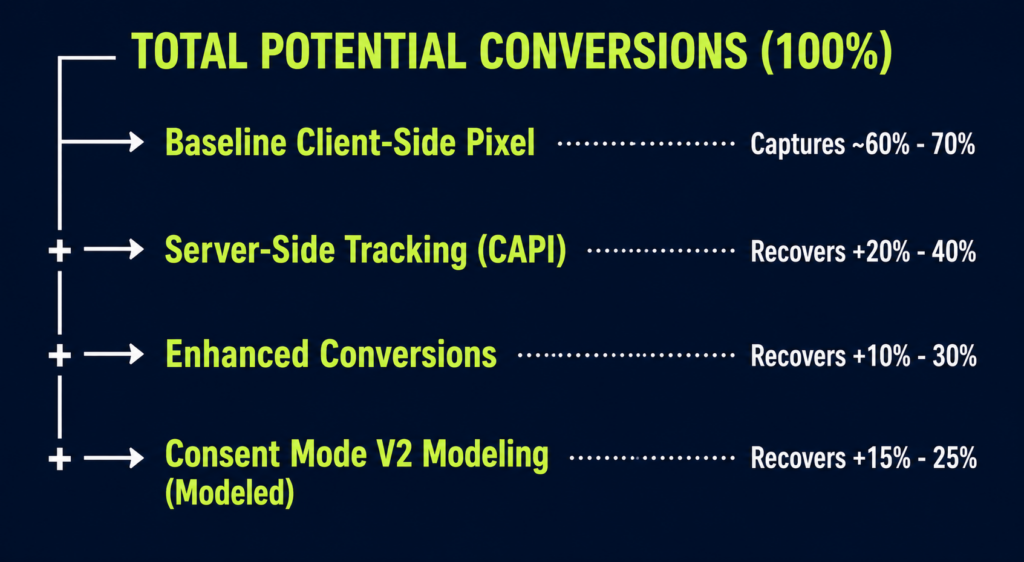
- Server-Side Signal Recovery: Routing event data through a dedicated server container bypasses browser-level ad blockers and cookie limits, recovering 20% to 40% of lost conversion data [¹].
- First-Party Matching: Enhanced conversions hash customer data (like email addresses) at checkout to match un-tracked conversions back to logged-in Google users, yielding a 10% to 30% boost in measured conversions [²] [⁴].
- Regulatory Compliance: Consent Mode V2 is mandatory for EEA/UK traffic; non-compliant setups risk conversion tracking blackouts, while compliant implementations use Google’s conversion modeling to fill data gaps [²] [³].
- GA4 Governance: Clean conversion tracking relies on structured event mapping, correct parameter passing (value, currency, transaction_id), and rigorous verification before setting GA4 key events [⁵].
Why Conversion Tracking Is Breaking Down
For over a decade, digital analytics relied on client-side pixel tracking: a user completed a conversion, a browser script fired, and third-party ad networks logged the event. That infrastructure has largely collapsed.
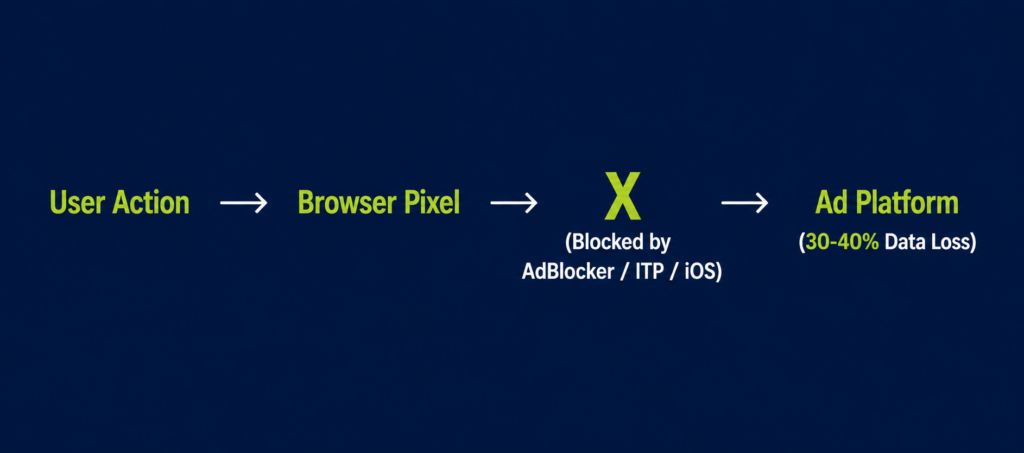
Browser-level privacy controls now systematically strip conversion signals before they reach your reporting dashboards:
- Ad Blockers: Over 31% of global internet users run ad-blocking software that halts client-side tracking scripts from executing [¹].
- App Tracking Transparency (ATT): Approximately 75% of iOS users opt out of tracking when prompted [¹].
- Cookie Duration Limits: Safari’s Intelligent Tracking Prevention (ITP) caps client-side cookie lifetimes at 7 days (or 24 hours for ad-click URLs).
- Third-Party Cookie Removal: Major browser engines have restricted third-party cookies across their tracking stacks.
When tracking scripts capture only 60% to 70% of true orders, calculated Return on Ad Spend (ROAS) drops artificially [¹]. More critically, ad platform machine-learning algorithms (Google Smart Bidding, Meta Advantage+) receive incomplete feedback loops, causing them to bid on sub-optimal audiences. Bypassing browser limits requires architectural migration from client-side to server-side data collection.
Client-Side vs. Server-Side Tracking: Architecture Breakdown
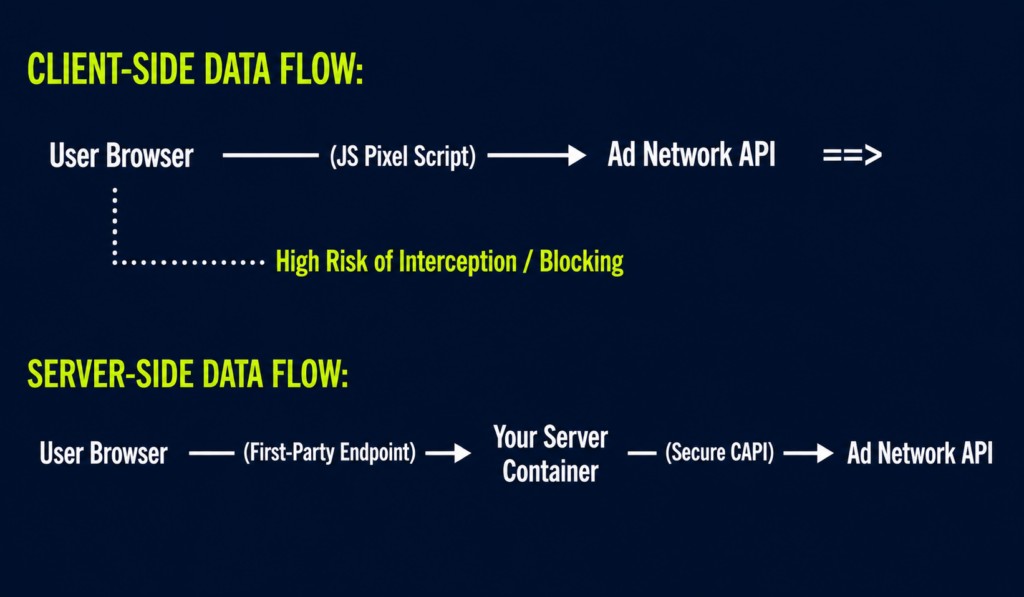
Client-side tracking places the burden of collection on the visitor’s device. Server-side tracking transfers collection to your private cloud server container, executing direct API calls to advertising platforms.
Direct Comparison Table
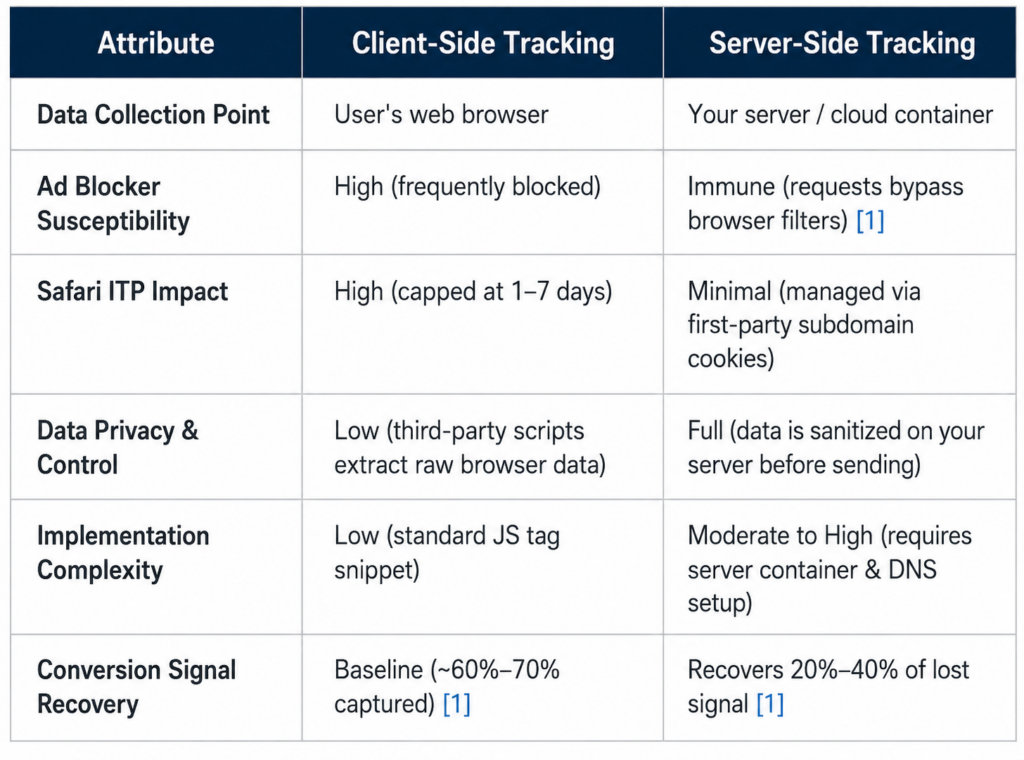
Implementing server-side tracking yields an immediate quality jump: 67% of B2B enterprises utilizing server-side pipelines report up to a 41% improvement in overall data accuracy [¹].
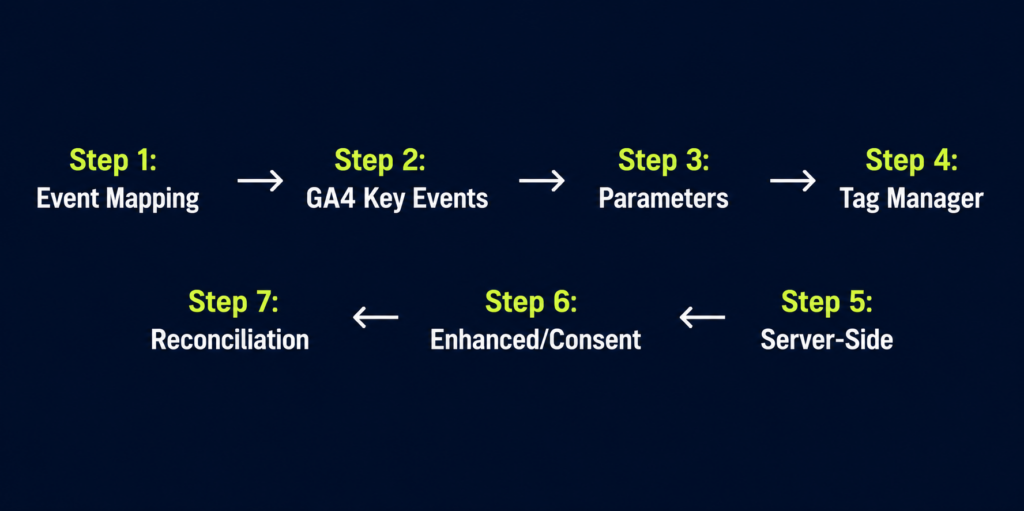
A 7-Step Conversion Tracking Setup Framework
To prevent broken attribution, missing values, or corrupted reporting, follow this deployment pipeline.
1. Map Every Conversion Entity
List every business-critical conversion action (purchases, lead forms, phone calls, demo bookings). Assign a clear monetary baseline to each action so ad networks can optimize for real revenue rather than raw traffic.
2. Configure GA4 Key Events Correctly
In Google Analytics 4, all interactions register as events. Confirm that raw events log accurately in DebugView before flagging them as Key Events (formerly known as GA4 Conversions) to prevent permanent (not set) dimension errors [⁵].
3. Require Mandatory Event Parameters
Every conversion tag must pass core contextual parameters:
- value (Numeric value of the transaction)
- currency (Standardized ISO code, e.g., USD)
- transaction_id (Unique identifier to prevent duplicate conversion counting)
4. Centralize Execution via Google Tag Manager (GTM)
Avoid hardcoding scripts directly into source code. Centralize event triggers and variables within GTM to enable version management, container rollback capabilities, and structured testing.
5. Deploy a Server-Side GTM Container
Set up a custom server container on a first-party subdomain (e.g., tracking.yourdomain.com). Route conversion webhooks directly to Google Conversions API (CAPI) and Meta CAPI endpoints [¹].
6. Layer Enhanced Conversions and Consent Mode
Enable cryptographic data hashing for user identifiers and implement Consent Mode V2 to maintain compliance while leveraging algorithmic data modeling [²] [⁴].
7. Conduct Monthly Data Reconciliation
Audit your ad platform performance monthly by comparing recorded platform conversions against core backend data (Shopify, CRM, or ERP orders). Reconcile variances to maintain tracking health.
Recovery Tactics: Enhanced Conversions & Consent Mode V2
Combining server-side transport with advanced signal recovery tactics maximizes tracking accuracy.
Enhanced Conversions: First-Party Matching
When a user converts, your system captures first-party identifiers (e.g., email address, phone number). The system applies a secure SHA-256 algorithm to hash this data locally before transmitting it to ad networks.
Google matches this hashed string against logged-in user accounts to attribute conversions that dropped off due to lost cookies [⁴]. Real-world implementations demonstrate a 10% lift in Search conversions and up to a 20%–30% net recovery rate when paired with consent frameworks [²] [⁴].
Consent Mode V2: Compliance Without Measurement Blackouts
Google mandates Consent Mode V2 across all EEA and UK traffic [²] [³]. When users interact with your Consent Management Platform (CMP):
- Consent Granted: Tags initialize normally with standard tracking cookies.
- Consent Denied: Tags suppress cookie storage and instead send cookieless, anonymized “pings” to Google servers [²].
Google applies machine learning to these cookieless signals, restoring 15% to 25% of unobserved conversions through statistical modeling without violating user privacy choices [²].
Turning Clean Data into Defensible ROI
Deploying a cookieless-ready infrastructure shifts marketing measurement from speculative estimates to validated business reporting:
- True CPA & ROAS Calculation: Eliminating the 30%+ undercount reveals lower actual CPAs and accurate ROAS metrics, preventing the premature shutdown of profitable media campaigns.
- Algorithmic Bidding Efficiency: Supplying ad networks with complete conversion signals feeds smart bidding models, driving down long-term customer acquisition costs.
- Cross-Channel Alignment: Combining reliable tracking data with an overarching first-party data and attribution strategy establishes a single source of truth for business leadership.
Furthermore, accurate event data powers downstream initiatives like conversion rate optimization and macro-level budget forecasting via a marketing measurement framework.
Partner with National Positions for Advanced Tracking Architecture
Transitioning to cookieless conversion tracking requires advanced data engineering, container management, and continuous schema oversight.
National Positions brings enterprise-grade analytics engineering to growing businesses:
- 22+ Years of Analytics Leadership: Over 300 successful brand implementations backed by a 97% client retention rate.
- Google Premier Partner Status: Recognized expertise in GA4 migration, Server-Side GTM deployments, and Consent Mode V2 integration.
- The PACE Methodology: Our integrated model (Plan, Analyze, Convert, Expand) anchors every campaign in rigorous data integrity.
- Proprietary Attribution Tech: Our first-party attribution platform, AdBeacon, unifies server-side tracking, cookieless signals, and multi-touch data to deliver un-siloed ROI insights.
Frequently Asked Questions
What is conversion tracking setup?
Conversion tracking setup is the architectural process of configuring your website, tag managers, analytics engines, and advertising APIs to record user actions (e.g., transactions, lead forms) and attribute them accurately to specific marketing campaigns.
Do I really need server-side tracking, or is a browser pixel enough?
Browser pixels are no longer sufficient for ad spend optimization. Standard client-side pixels lose 30% to 40% of conversion signals due to ad blockers, cookie limits, and tracking opt-outs [¹]. Server-side tracking is required to recover this data.
What is the difference between GA4 key events and conversions?
In March 2024, Google updated its terminology, designating standard analytics conversions as “Key Events” [⁵]. Key events define critical business actions measured in GA4, which can then be shared with Google Ads to function as conversion goals for ad bidding optimization.
Is Consent Mode V2 strictly required?
If your website receives traffic from the European Economic Area (EEA) or the United Kingdom (UK), Consent Mode V2 is mandatory [²] [³]. Non-compliant sites lose conversion tracking and remarketing features across Google Ads platforms [³].
How much total lost data can a cookieless tracking stack recover?
A fully integrated server-side setup utilizing Enhanced Conversions and Advanced Consent Mode typically restores 30% to 50% of missing conversion signals, elevating overall tracking accuracy close to true backend sales totals [¹] [²] [⁴].
Sources & References
- Leadgen Economy, “Server-Side Tracking: Recover 20-40% Lost Conversions,” Leadgen Economy Insights.
- Dataslayer.ai, “Track Google Ads After Consent Mode V2, 2025 Guide,” Dataslayer Analytics Blog.
- PPC Land, “Consent Mode V2 enforcement is silently breaking Google Ads conversions,” PPC Land Industry News.
- DP6, “Enhanced Conversions: How to recover lost conversions and improve measurement on Google,” DP6 Engineering.
- Analytics Mania, “Track Key Events with Google Analytics 4 (GA4 Conversions),” Analytics Mania Technical Guides.