Server-side tracking sends website and application events to a controlled server endpoint before routing approved data to analytics, advertising, and customer platforms. This architecture can improve measurement reliability, data governance, and campaign optimization. It does not replace consent management or create a first-party data strategy on its own.
Browser restrictions, ad blockers, consent choices, mobile privacy controls, and tracking errors can prevent conversions from appearing in marketing reports. When advertising platforms receive incomplete information, automated campaigns may optimize around an inaccurate picture of customer behavior.
For small and midsize businesses, server-side tracking provides a more controlled way to collect eligible marketing signals, connect them with business data, and measure how campaigns contribute to leads and revenue.
Key Takeaways
- Server-side tracking routes events through a controlled server endpoint before sending approved information to marketing platforms.
- It can reduce measurement gaps caused by browser restrictions, ad blockers, and unreliable client-side scripts.
- Server-side tracking supports first-party data collection, but the two terms are not interchangeable.
- Many implementations use browser and server events together rather than eliminating client-side tracking.
- Consent choices must be passed to and enforced by the server-side system.
- Accurate deduplication prevents browser and server events from being counted twice.
- Common tools include Google Tag Manager server-side tagging, GA4, Google Ads enhanced conversions, and the Meta Conversions API.
- Successful implementation requires planning, validation, monitoring, and maintenance.
What Is Server-Side Tracking?
Server-side tracking is a method of processing marketing events through a server environment that a business controls or manages. Instead of sending every event directly from a visitor’s browser to platforms such as Google or Meta, the website sends information to a server endpoint first.
The server can then validate, filter, format, enrich, and route the data according to predefined rules.
Think of client-side tracking as sending separate packages directly from your website to multiple vendors. Server-side tracking creates a central sorting facility. Each package reaches the facility first, where the business determines what it contains, how it should be handled, and which approved destination should receive it.
How Does Server-Side Tracking Work?
A typical server-side tracking process follows these steps:
- A visitor completes an action, such as viewing a product, submitting a form, calling the business, or making a purchase.
- The website or application generates an event containing information about that action.
- The event is sent to a server-side collection endpoint, often through a first-party subdomain.
- The server checks the event format and applicable consent status.
- Unnecessary information can be removed, approved identifiers can be hashed, and business context can be added.
- The server routes the approved event to platforms such as GA4, Google Ads, Meta, or a customer data platform.
- The business monitors delivery, discrepancies, consent signals, and platform diagnostics.
The server does not automatically collect every customer interaction. A sound implementation still requires an event plan that defines which actions matter, what information each event contains, and where the information can be sent.
Client-Side vs. Server-Side Tracking
Client-side tracking runs through scripts, pixels, and tags in the visitor’s browser. Those tools send information directly to third-party platforms. This method is relatively easy to implement, but its reliability can be affected by browser settings, ad blockers, JavaScript errors, consent choices, and network interruptions.
Server-side tracking introduces a controlled layer between the website and the platforms receiving its data.
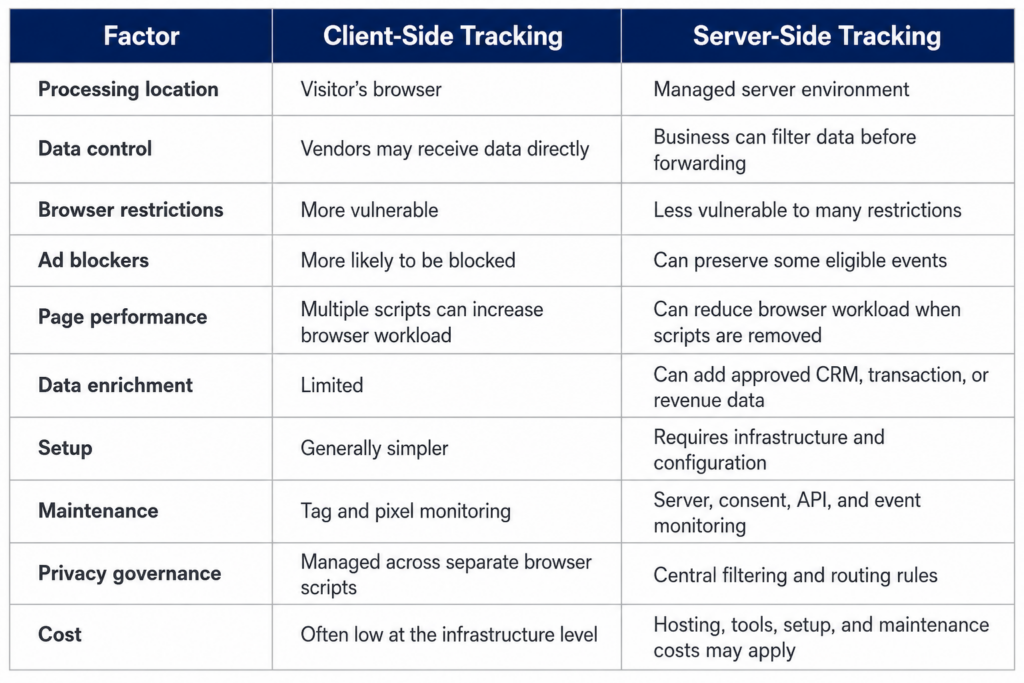
Client-side tracking may still play an important role. Many businesses use a hybrid model in which browser tags capture immediate interactions and server events confirm important business outcomes.
Why Traditional Marketing Tracking Is Losing Signals
Traditional tracking is becoming less dependable, but the reasons extend beyond third-party cookie changes.
Safari and Firefox restrict third-party tracking by default. Google changed its plan to eliminate third-party cookies universally from Chrome and continues to provide users with cookie controls. Chrome Incognito blocks third-party cookies by default.[¹]
Other causes of signal loss include:
- Ad blockers that prevent analytics and advertising requests
- Consent decisions that restrict analytics or advertising storage
- Mobile privacy protections
- Shorter browser-based identifier lifespans
- JavaScript errors and incomplete tag configurations
- Cross-domain tracking problems
- Forms, calls, and offline sales that are not connected to ad platforms
- Duplicate events caused by overlapping tracking tools
- CRM records that cannot be matched with original marketing sources
The percentage of missing conversions varies by website, browser mix, consent rate, device usage, tracking architecture, and customer journey. A universal conversion-loss percentage cannot accurately describe every business.
The better approach is to compare analytics and advertising-platform events with confirmed CRM leads, ecommerce transactions, phone calls, appointments, and revenue.
Server-Side Tracking and First-Party Data Are Not the Same
First-party data is information a business collects through direct interactions with customers and prospects. Examples include:
- Website form submissions
- Ecommerce purchases
- Customer accounts
- Email subscriptions
- Sales conversations
- Phone calls
- Appointment bookings
- Loyalty program activity
- Customer service records
- CRM opportunities and completed sales
Server-side tracking is one method for processing and transmitting selected first-party events. A business can collect first-party data without using server-side tracking. It can also install a server-side system without having a complete first-party data strategy.
The value comes from connecting the two. Server-side tracking can help a business route approved customer events into analytics, advertising, CRM, and reporting systems with greater consistency and control.
How Server-Side Tracking Supports a First-Party Data Strategy
When information passes through a controlled server environment, a business can apply rules before sending it to another platform. Depending on the system and legal requirements, those rules may include:
- Checking the visitor’s consent status
- Removing unnecessary fields
- Blocking prohibited information
- Hashing approved customer identifiers
- Standardizing event names and values
- Adding transaction value or lead status
- Separating marketing and analytics destinations
- Suppressing events that do not meet defined conditions
- Logging data transfers for testing and governance
For example, a browser may record that a form was submitted. A connected CRM can later determine that the submission became a qualified sales opportunity. Server-side processes may allow the qualified-lead event to be returned to an advertising platform, subject to applicable consent and privacy requirements.
This helps campaigns optimize toward meaningful business results rather than treating every form submission as equally valuable.
Server-Side Tracking vs. Server-Side Tagging
The terms are related, but they describe different parts of the process.
Server-side tracking is the broader method of sending and processing events through a server environment.
Server-side tagging usually refers to implementing that method through a tag-management platform, such as a Google Tag Manager server container.
Google Tag Manager server-side tagging is a common option, but it is not the only one. Businesses may also use:
- Direct platform APIs
- Ecommerce platform integrations
- Managed server-side tracking providers
- Cloud-hosted collection endpoints
- Custom application integrations
- CRM and offline conversion connections
The right approach depends on the company’s website, advertising platforms, development resources, privacy requirements, event volume, and reporting goals.
Common Server-Side Tracking Tools
Google Tag Manager Server-Side Tagging
A Google Tag Manager server container receives incoming events and processes them in a server environment. It can then send approved data to GA4, Google Ads, Meta, and other destinations.
Google explains that server-side tagging can improve performance, security, and data quality by moving some tag processing away from the browser.[²]
Google Analytics 4
GA4 events can be routed through a server-side container or sent from backend systems using supported collection methods. This can provide more consistent delivery, but it does not correct an incomplete event strategy or override consent requirements.
Google Ads Enhanced Conversions
Enhanced conversions use hashed first-party customer information to improve conversion measurement. Depending on the implementation, approved information such as an email address or phone number may be normalized, hashed, and sent to Google to help match conversions with ad interactions.
Meta Conversions API
The Meta Conversions API creates a direct connection between a business’s marketing data and Meta. Website events, app events, offline activity, and messaging events may be sent through the API when properly configured.[³]
The Conversions API commonly operates alongside the Meta Pixel. This makes event deduplication an important part of implementation.
Hybrid Tracking and Event Deduplication
Many businesses retain some browser-based tracking after implementing server-side tracking. This hybrid approach allows browser and server events to support each other.
For example, the Meta Pixel may send a browser-based purchase event while the ecommerce backend sends confirmation of the same purchase through the Conversions API. Without deduplication, Meta could count one transaction twice.
Meta recommends using matching event names and event IDs to identify duplicate browser and server events.[⁴] The event ID must refer to the same action in both channels.
Poor deduplication can cause:
- Inflated conversion totals
- Artificially low cost-per-acquisition figures
- Inaccurate return-on-ad-spend calculations
- Duplicate revenue
- Corrupted campaign-learning signals
- Disagreements between platform and CRM reports
Testing should confirm that browser and server events are being received, matched, and counted correctly.
Benefits of Server-Side Tracking
More Reliable Conversion Measurement
Server-side tracking can preserve some eligible events that browser restrictions or blockers might prevent from reaching a third-party platform. The amount recovered depends on the existing setup and audience.
Better Campaign-Optimization Signals
Automated advertising systems depend on conversion information. Sending more complete and accurate lead, transaction, and revenue signals can help platforms optimize toward actions that contribute to business growth.
Greater Data Control
A server-side system gives the business a central point for deciding which fields are sent to each vendor. Data can be validated, reformatted, redacted, or blocked based on established rules.
Stronger First-Party Data Activation
Server-side processes can connect marketing events with approved CRM, ecommerce, call-tracking, or revenue information. This can support audiences, value-based optimization, qualified-lead reporting, and customer analysis.
Potential Site-Performance Improvements
Moving processing away from the browser can reduce page workload when client-side scripts are removed or consolidated. The actual improvement depends on which tags remain and how the implementation is configured.
More Consistent Reporting
A properly configured system can reduce gaps among analytics, advertising, ecommerce, and CRM records. It will not create perfect agreement because platforms use different attribution methods, identities, and reporting windows.
Centralized Privacy Controls
Businesses can use the server as a checkpoint for consent enforcement, data minimization, filtering, and routing. These capabilities support stronger governance, but they do not make an implementation automatically compliant.
Does Server-Side Tracking Replace Consent Management?
No. Server-side tracking changes how information is processed and transmitted. It does not remove consent or privacy obligations.
Consent management platforms generally control browser scripts and communicate a visitor’s preferences. They cannot directly stop a server-to-server transfer. The consent signal must reach the server-side system, and the server must be configured to enforce it.[⁵]
A responsible implementation should account for:
- Applicable consent requirements
- The legal basis for processing
- Data minimization
- Privacy disclosures
- Data retention
- Vendor agreements
- Security controls
- Requests to access or delete personal information
- Regional data-storage requirements
- Restrictions involving sensitive information
Server-side tracking should not be used to conceal data collection or circumvent a visitor’s choices. Businesses should work with qualified privacy and legal professionals when evaluating their obligations.
What Server-Side Tracking Cannot Do
Server-side tracking improves infrastructure, but it does not solve every measurement problem.
It cannot:
- Override a valid consent choice
- Recover an event that was never generated
- Guarantee complete attribution
- Automatically identify one customer across multiple devices
- Repair unclear conversion definitions
- Correct unreliable CRM data
- Eliminate every cookie
- Prevent every blocker from affecting collection
- Guarantee faster pages
- Replace ongoing testing and maintenance
It also introduces new technical responsibilities. These can include cloud hosting, API updates, data security, consent enforcement, debugging, event validation, and monitoring.
Does Your Business Need Server-Side Tracking?
A business may benefit from server-side tracking if:
- CRM leads do not match advertising-platform conversions
- Recorded transactions exceed tracked purchases
- Paid campaigns rely heavily on automated bidding
- Advertising runs across several platforms
- Qualified leads and completed sales are not returned to ad platforms
- Numerous third-party scripts affect website performance
- Calls, appointments, or offline sales are missing from marketing reports
- Teams regularly disagree about which report is accurate
- The business needs tighter control over information sent to vendors
- Advertising decisions depend on an incomplete view of revenue
Server-side tracking may not be the first priority if:
- Basic client-side tracking is missing or incorrectly configured
- The company has not defined its primary conversion actions
- CRM records are incomplete or inconsistent
- Advertising volume is limited
- The business lacks a consent management process
- No one can maintain and monitor the implementation
- Marketing platforms are optimizing toward low-quality conversion actions
A tracking audit can help determine if the problem requires server-side infrastructure or if the existing measurement system needs to be repaired first.
How to Implement Server-Side Tracking
A structured implementation typically includes the following stages:
1. Define Business Outcomes
Identify the events that represent meaningful progress, such as qualified leads, booked appointments, completed purchases, recurring customers, or closed sales.
2. Audit Existing Tracking
Inventory active tags, pixels, analytics properties, advertising accounts, consent tools, CRM integrations, call-tracking systems, and ecommerce connections.
3. Map the Data Flow
Document where each event begins, which system receives it, what fields it contains, and which platforms need access to it.
4. Choose an Implementation Method
Select a server-side GTM container, managed provider, platform integration, direct API connection, or custom architecture.
5. Configure Consent Enforcement
Make sure consent status travels with the event and controls which destinations can receive it.
6. Establish Event Standards
Create consistent event names, parameters, values, timestamps, and event IDs.
7. Filter and Protect Data
Remove unnecessary information and prevent restricted or sensitive data from reaching unauthorized platforms.
8. Test Browser and Server Events
Confirm that events fire at the correct time, contain the expected values, and reach their intended destinations.
9. Validate Deduplication
Check that hybrid browser and server events are matched instead of counted twice.
10. Monitor the System
Review errors, event volume, platform diagnostics, consent behavior, hosting usage, and discrepancies on an ongoing basis.
How to Measure a Successful Implementation
Establish a baseline before making changes. After launch, compare results over a representative period.
Useful measurements include:
- Confirmed CRM leads compared with platform-reported leads
- Recorded transactions compared with analytics purchases
- Revenue received by advertising platforms
- Browser and server event-match rates
- Duplicate-event rates
- Consent-state enforcement
- Unassigned and unattributed conversions
- Reporting differences by browser and device
- Page weight and Core Web Vitals
- Cost per qualified lead
- Cost per completed sale
- Return on ad spend based on confirmed revenue
An increase in attributed conversions does not automatically represent new revenue. In many cases, it means the platforms can now recognize conversions that were already occurring.
How National Positions Builds a Stronger Data Foundation
For more than 22 years, National Positions has helped small and midsize businesses improve digital marketing performance and understand how their campaigns contribute to growth. Our Google Premier Partner status reflects our experience managing complex digital advertising programs.
National Positions approaches server-side tracking as part of a broader measurement strategy. We evaluate the path from customer action to reported revenue by examining website events, advertising-platform conversions, analytics data, CRM records, calls, and completed transactions.
Using our PACE methodology of Plan, Analyze, Convert, and Expand, we can identify measurement gaps and develop a first-party data strategy aligned with your campaigns, customer journey, and reporting needs.
Depending on the business and its existing technology, this may include:
- Conversion and event tracking audits
- GA4 event planning
- Server-side tagging recommendations
- Advertising-platform conversion integrations
- CRM and offline conversion connections
- Consent signal reviews
- Browser and server event deduplication
- Cross-platform reporting analysis
- Post-launch validation and monitoring
The goal is not to collect the greatest possible amount of information. It is to build a dependable measurement system that gives your team the approved data needed to make informed marketing decisions.
Find Out Where Your Measurement Gaps Begin
Missing events, duplicate conversions, broken consent signals, and disconnected CRM data can make successful campaigns appear weaker than they are. They can also make underperforming campaigns look deceptively effective.
A data and tracking audit can help identify where those discrepancies begin.
Schedule a free data and tracking audit with National Positions to review your current measurement setup, identify high-priority gaps, and receive practical recommendations for building a stronger first-party data foundation.
Frequently Asked Questions
What is server-side tracking?
Server-side tracking sends website or application events to a controlled server endpoint before forwarding approved information to analytics, advertising, or customer platforms. The server can validate, filter, enrich, and route each event according to the business’s rules.
What is the difference between client-side and server-side tracking?
Client-side tracking processes events through scripts in a visitor’s browser. Server-side tracking processes events through a managed server environment before sending information to third-party platforms. Server-side tracking provides greater control, but it requires more configuration and maintenance.
Is server-side tracking the same as first-party data?
No. First-party data is information collected through direct customer and prospect interactions. Server-side tracking is an architecture used to process and distribute selected events. It can support a first-party data strategy without replacing the strategy itself.
Does server-side tracking replace the Meta Pixel?
Usually not immediately. Many implementations use the Meta Pixel and Conversions API together. Matching event names and event IDs help Meta recognize browser and server versions of the same conversion.
Does server-side tracking replace cookies?
No. It can reduce dependence on third-party browser cookies, but many setups still use first-party cookies or other identifiers. Applicable consent and disclosure requirements remain in place.
Does server-side tracking help with cookie restrictions?
It can reduce reliance on browser-based third-party tracking and make some consented first-party events more reliable. It does not remove browser privacy rules or allow businesses to disregard user choices.
Is server-side tracking GDPR or CCPA compliant?
Server-side tracking is not automatically compliant. It can support better data control, minimization, and consent enforcement. Compliance depends on the information collected, the reason for collecting it, user choices, security practices, disclosures, and applicable laws.
Is server-side tracking completely accurate?
No tracking method is completely accurate. Server-side tracking can improve event delivery and data control, but results still depend on event design, consent, configuration, deduplication, attribution methods, and ongoing maintenance.
Can server-side tracking connect marketing data with CRM revenue?
A properly designed system can send eligible CRM events, such as qualified leads or completed sales, to analytics and advertising platforms. This can help campaigns optimize toward business outcomes rather than form submissions alone.
Is server-side tracking the same as Google Tag Manager server-side tagging?
No. Google Tag Manager server-side tagging is one way to implement server-side tracking. Other options include direct APIs, ecommerce integrations, managed providers, and custom server connections.
How much does server-side tracking cost?
Costs depend on event volume, hosting, implementation method, connected platforms, CRM complexity, consent requirements, and ongoing maintenance. Expenses may include an initial setup fee, cloud hosting, managed-service subscriptions, and monitoring.
How long does server-side tracking take to implement?
A focused platform integration may take several days. A complex implementation involving multiple websites, advertising platforms, CRM systems, consent rules, and offline conversions can require several weeks of configuration and validation.
Sources
- Google Privacy Sandbox. “Next Steps for Privacy Sandbox and Tracking Protections in Chrome.” https://privacysandbox.com/news/privacy-sandbox-next-steps/
- Google for Developers. “An Introduction to Server-Side Tagging.” https://developers.google.com/tag-platform/tag-manager/server-side
- Meta for Developers. “Conversions API.” https://developers.facebook.com/documentation/ads-commerce/conversions-api
- Meta for Developers. “Deduplicate Pixel and Server Events.” https://developers.facebook.com/documentation/ads-commerce/conversions-api/deduplicate-pixel-and-server-events
- Osano. “Server-Side Tracking: What Is It, and How Does It Impact Privacy Compliance?” https://www.osano.com/articles/server-side-tracking